
SaaS · Desktop · Windows

Software that
works in everyday business
– cloud and desktop.

Focused software solutions for real business processes – clear, reliable and without unnecessary complexity.

About Us

Your partner for practical software solutions – as SaaS and as Windows desktop applications.

We develop focused software solutions for real challenges in day-to-day business. Depending on the use case, we build a centralized SaaS platform or a locally installed Windows desktop application. The goal is not technology for its own sake, but a tool that simplifies processes, improves transparency and fits reliably into existing workflows. We continuously expand our product portfolio.

SaaS when collaboration matters

Browser-based solutions for teams, centralized data and location-independent access.

Desktop when local control matters

Windows applications for focused workflows, local data storage and direct integration into the workplace.

Clear solutions without unnecessary complexity

Our products focus on concrete value, straightforward usability and transparent licensing models.

Do you have a good idea for a software solution?

If a useful tool is missing from your daily work or a process is unnecessarily complicated, talk to us. We evaluate the use case, demand and the most suitable form of implementation – as SaaS, a desktop application or a targeted combination of both.

Feedback on our existing solutions

We continuously improve our products and welcome feedback from real-world use. Feature requests are also welcome: we evaluate them based on value, feasibility and relevance for current and future users.

Solutions

From centralized web platforms to locally installed Windows applications, we choose the approach that best fits the problem.

Cloud & Browser

SaaS Solutions

For collaboration, centralized administration and access from different locations and devices.

SaaSQR & Links

Re-Direction

Re-Direction is a central platform for managing digital destinations. Companies, teams, organizations and public-sector users can manage dynamic QR codes, branded short links, bio pages, vCards, surveys and campaign links in one place. Destinations can be changed later without having to reprint existing QR codes. Tracking and analytics make clicks and scans measurable, while roles, responsibilities and multi-user setups keep teamwork organized. It is designed for marketing, communications, events, print materials, service workflows and other digital touchpoints.

SaaSRisk & Compliance

risks.app

risks.app combines collaborative risk management with integrated document compliance. Risks can be captured, assessed, prioritized and assigned to responsible users; actions, status and progress remain transparent to everyone involved. Policies and other binding documents can also be managed centrally, versioned and distributed to specific users or groups. The application records who accepted which policy and when the acknowledgement was made. This creates an auditable compliance trail that brings risk, action and policy management together in one workflow.

Windows

Desktop Solutions

For local data storage, focused workflows and tools that run directly on the Windows desktop.

Windows DesktopSwiss QR Bill

QRFaktura

QRFaktura is a Windows desktop application for Swiss SMEs, self-employed professionals and service providers who want to keep their invoicing data locally under their own control. The software supports quotations, Swiss QR invoices as PDF files, customer and item master data, partial and full payments, and outstanding receivables. CAMT.054 bank files can be imported to check payment references and suggest matching invoices. Multiple companies or tenants, Excel import/export and support for German, French, Italian and English complete the invoicing workflow.

Microsoft StoreWindows Utility

Activity Simulator

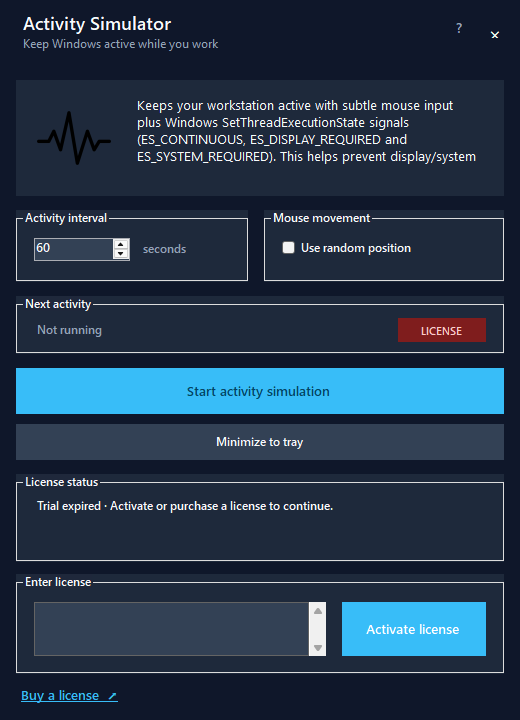
Activity Simulator is a compact Windows utility for situations where a PC needs to remain active while a task is running. At configurable intervals, the application simulates subtle mouse interactions and also sends Windows execution-state signals to help prevent the display or system from automatically entering power-saving, sleep or standby modes due to inactivity. Random mouse positions can be enabled as an option. The tool is useful for presentations, long downloads, tests, monitoring displays and other tasks that should not be interrupted by automatic inactivity actions.

Windows app for the Microsoft Store

Contact Us

Have a question, a product idea or want to learn more about our solutions? Get in touch with us.

Your message has been sent!

Spam code: Spam code